Voided Vessel: Escape Game
Project Type
Game Design and Development
Date
May 2023 - August 2023
Team Size
5
Tools/Software
Unity, Adobe Photoshop, Git, Clipchamp Studio
Role
Game Design/Development, Digital Art, User Interface Design, Video Editing
A 3D horror game set in outer space. You are an astronaut on a mission to rescue a neighboring space vessel that has been invaded by mysterious aliens. You must navigate through levels by evading alien creatures.


About the Game
Story
-
Our game is set in the distant future; humanity is exploring the galaxy.
-
You, the player, are an astronaut. One day, You receive a distress message from another ship, so you and two other astronauts board a shuttle pod to assist them.
-
Crewmates aboard the ship are mysteriously disappearing. Once aboard, you start moving from room to room, realizing something isn’t quite right; much equipment is damaged or missing. Suddenly, the lights go out and your crewmates vanish.
-
Eventually, you discover that parasitic, squid-like aliens have infiltrated the ship. Using your detective skills and puzzle-solving abilities, you must evade the aliens as long as you can until you can escape and stop them from spreading to other ships.
Objective
-
Complete puzzles to progress
-
Repair damaged equipment
-
Destroy the ship to put an end to the parasitic aliens on board
-
Escape!
Rules
-
Collect and utilize items to solve puzzles
-
Interact with objects in the environment
-
Avoid the aliens by hiding and sneaking
-
Do not fight the aliens!
Early Demo
Designing a Monster
A space horror game needs a compelling antagonist, a terrifying monster. The team wanted a "tentacle" monster that also took inspiration from existing fictional creatures: Cthulu, Venom from Spiderman, and Xenomorphs from Alien. I wanted to create a design that was scary, but not too complicated to 3D model.
.png)
Alpha Playtesting
Procedure
User testing involved two parts: playtesting and post-survey.
Playtesting
-
Before each task, administrators should inform players of the following:
-
Game controls: TAB to open/close item levels, number keys 1-3 for persistent items, E to interact with things in the levels, Shift to Sprint.
-
Task (level) to be completed
-
Time limit of 10 minutes for each task
-
Encouraged to think aloud while playing
-
-
During the Player Tasks, administrators strictly observe players. They do not give any hints or direction toward completing levels.
-
Administrators take notes on the following during each task:
-
Features that gave users difficulty or frustration (Player Pains)
-
Features that players enjoyed (Player Gains)
-
Bugs or glitches that the player encountered
-
How many times the player died
-
How long the players take to complete the level
-
-
Player Tasks
-
Complete the Tutorial Level
-
Complete the Maze Level
-
Survey: After completing all Player Tasks, administrators instruct players to complete the survey. The survey asked players to rate different aspects (enjoyability, difficulty, aesthetics, etc.) of the game.
Key Takeaways
While all users were able to easily clear the Tutorial Level of the game, many found difficulty with or could not complete the Maze Level. Rather than make the Maze Level easier to complete, which may detract from the gameplay experience, we opted to do one of two things:
-
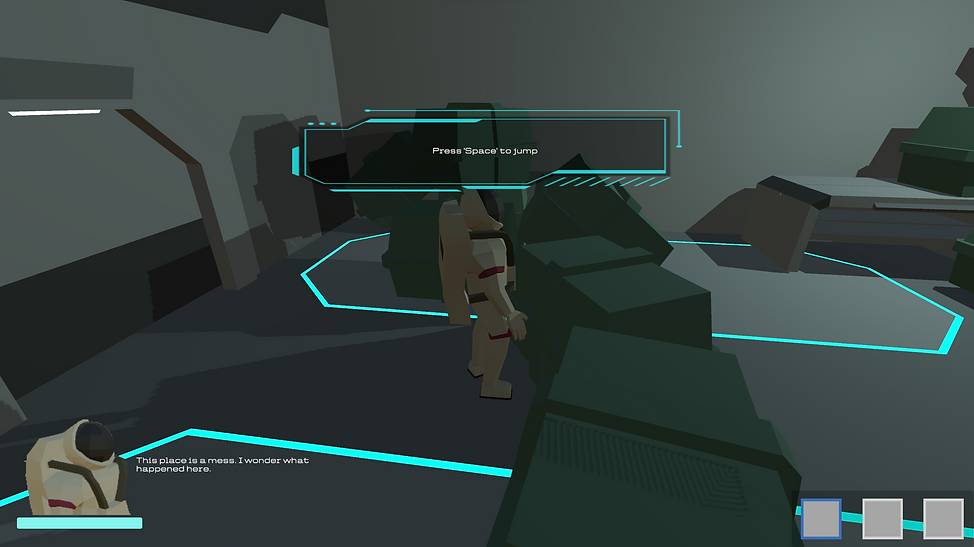
Better prepare players in the Tutorial Stage for the more difficult Maze Level: add tooltips to teach player controls, add obstacles and more tasks for the player to complete so that they can become comfortable with game mechanics
-
Add mechanics and items to the Maze Level to assist players and offer gameplay flexibility: blend in hints in the form of character dialogue, add consumable items and sneak mechanic
My Implementations
UI Features
-
Stamina Bar: An essential mechanic of any horror game, adding an extra challenge when evading aliens.
-
Consumable Items: Our game consisted of two types of items: consumable and essential. Consumable items are items the player may use to help them evade aliens. Players are limited to three consumable items, which persist between levels and can be dropped. Essential items are items that are required to complete levels. They do not persist between levels and cannot be dropped. To prevent confusion between the two, consumable items are displayed on the bottom right of the HUD and can be accessed with 1-3 keys. I felt this was optimal because players will find themselves in situations where they may need to use a consumable item in a quick response.
-
Inventory: A circle inventory containing essential items can be brought up while holding TAB.
-
Character Icon and Dialogue: Throughout levels, the character gives hints to the player in the form of dialogue.
-
Tooltips: Tooltips pop up throughout the tutorial level to teach players game controls.
Other Implementations
-
Tutorial Level Design
-
Sprite art
-
Trailer Video
.png)
.png)
