Glo Skincare App (Case Study)
Project Type
UI/UX Design and Research
Date
August 2022 - December 2022
Team Size
4
Tools/Software
Figma, Canva
Role
UI/UX Design and Research
Glo is an educational mobile application designed to help beginners in skincare start a skincare routine by getting to know their own skin, teaching them the routine steps, and helping them find products best suited for their skin.


Learning Objectives & Primary Audience
Our primary audience for Glo was beginners and novices to skincare in all age groups, with a slight emphasis on Gen Z and millennials.
Users should be able to...
-
Identify their skin type and any specific characteristics (oily, dry, combination, normal, sensitive, acne-prone etc.)
-
Identify each step of daytime and nighttime skincare routines and receive feedback on whether their choices regarding skincare may harm or benefit their skin.
-
Transfer knowledge acquired from learning modules to create a personal skincare routine.
Research of Existing Applications
Procedure
Participants will be asked to use one of four applications: Good Face Project, Think Dirt, Mimoglow, Charm, RYNKL. Participants will perform a series of predetermined tasks. The researcher will ask the learner to complete each task one at a time. While completing each task, learners will be asked to think aloud, while the researcher takes notes by hand or on a Google Doc.
Findings
Here are some ways we wanted to improve on existing skincare routine applications:
-
Lack of user feedback and interactivity: while some apps were informative, a lot of the information could be overwhelming and difficult to learn from.
-
Assumptions of pre-existing knowledge: skincare quizzes can be a great place to get started, but we found that beginners may struggle with answering some of the questions without some basic knowledge of skincare.
-
Lack of personalization/customizability: some apps did not account for certain skin concerns and needs and did not offer features to tweak routines.
-
Aesthetic design: skincare should be a part of everyone's routine, regardless of age or gender. We found that many apps tended to have a feminine design, which may deter male users.
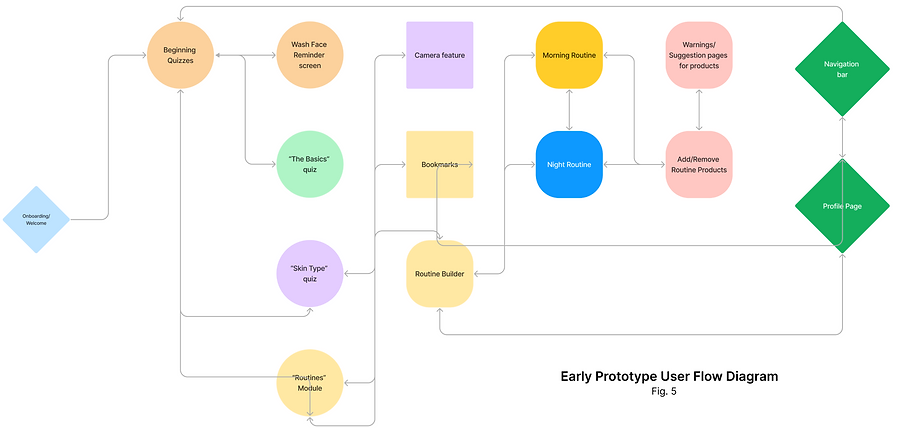
Early Prototype User Flow Diagram
Testing our Prototype
Procedure
Our learners will perform a series of predetermined scenarios in our educational environment. While completing each task, learners will be asked to think aloud, while the researcher takes notes by hand or on a Google Doc. With the learner’s permission, we will record audio or video of the activity.
Think Aloud Tasks:
-
Complete the introductory skincare quiz
-
Add an item to the morning skin care routine
-
Read a product’s ingredient list under the routine
-
Add an item to the routine
-
Document your skin
-
Rate a product
Following the think aloud tasks, learners will be given a follow-up survey through Google Forms. The survey may ask learners what features they liked or disliked, what stood out, and what they found difficult.
Participants
There were a total of 8 participants, between the ages of 16-30.
Results


Key Takeaways
-
Skincare quizzes and the routine tracker were the features that participants felt they would most benefit from.
-
Participants disliked when information was presented in long paragraphs, discouraging them from fully learning material that may be essential.
-
Some features, particularly dropdowns for more information, were not as intuitive as expected.
-
Users wanted feedback when making choices that may harm their skin.
Final Design Features & Justification
Skincare Quizzes | Allow users to set their own learning goals
Quiz results help personalize learner experiences to best suit their skincare needs. During our analysis of other quizzes on skincare apps, we found that beginners may have difficulty identifying their skin type. Our quiz specifically aimed to educate users as they took the quiz. Each answer choice includes a dropdown button to read more information. We also included a "mirror" feature which opens the front camera, allowing users to look at their skin as they take the quiz.

Routine Builder | Using transfer of knowledge in order to assess information learned in the quizzes and modules
One of our main goals when designing Glo was to find a balance between allowing users autonomy to make their own skincare decisions, while also ensuring that users made decisions that were not detrimental to their skin. Our solution to this was to let users make informed decisions.
With the routine builder, users are encouraged to add products, after being given ingredient and product recommendations following the skincare quiz. Glo provides a basic daytime and nighttime skincare routine but users are welcome to customize the order and steps.
Warning Feature
If users want to add a product with an ingredient that does not mix well with another product, add a product that may not be suitable, or any other action that may harm their skin, the app will warn the user and inform them why their action may not be safe.


Learning Modules | Learning is incorporated into other features, giving users a chance to read further into topics and terms they are unfamiliar with
By consolidating skincare information under one platform, users can easily view information about their skin in modules scattered throughout the application. We wanted Glo to guide users through the process of beginning a skincare routine while offering educational lessons and tips along the way. Because skincare is a brief but essential part of daily routine, we aimed to provide an informative, yet non-obtrusive experience where users could learn at their own pace.

Routine Tracker | Helps users track their progress with a specific product
Glo has a calendar feature that includes a routine tracker and a product tracker.
Product Tracker
The product tracker allows users to track the progress of their skin with a specific product over time. Users can choose how often they want to track a product, and Glo will remind them when it is time to log a progress check, which involves users taking a selfie. Users can also rate and review products that they try and can view community feedback on products from other users.
Routine Tracker
Consistency is the key to progress. To best help maintain a consistent routine, users are encouraged to utilize the routine tracker. With a push of a button, users can mark a routine as complete. The calendar provides visual data to users on their skincare routine progress.

